

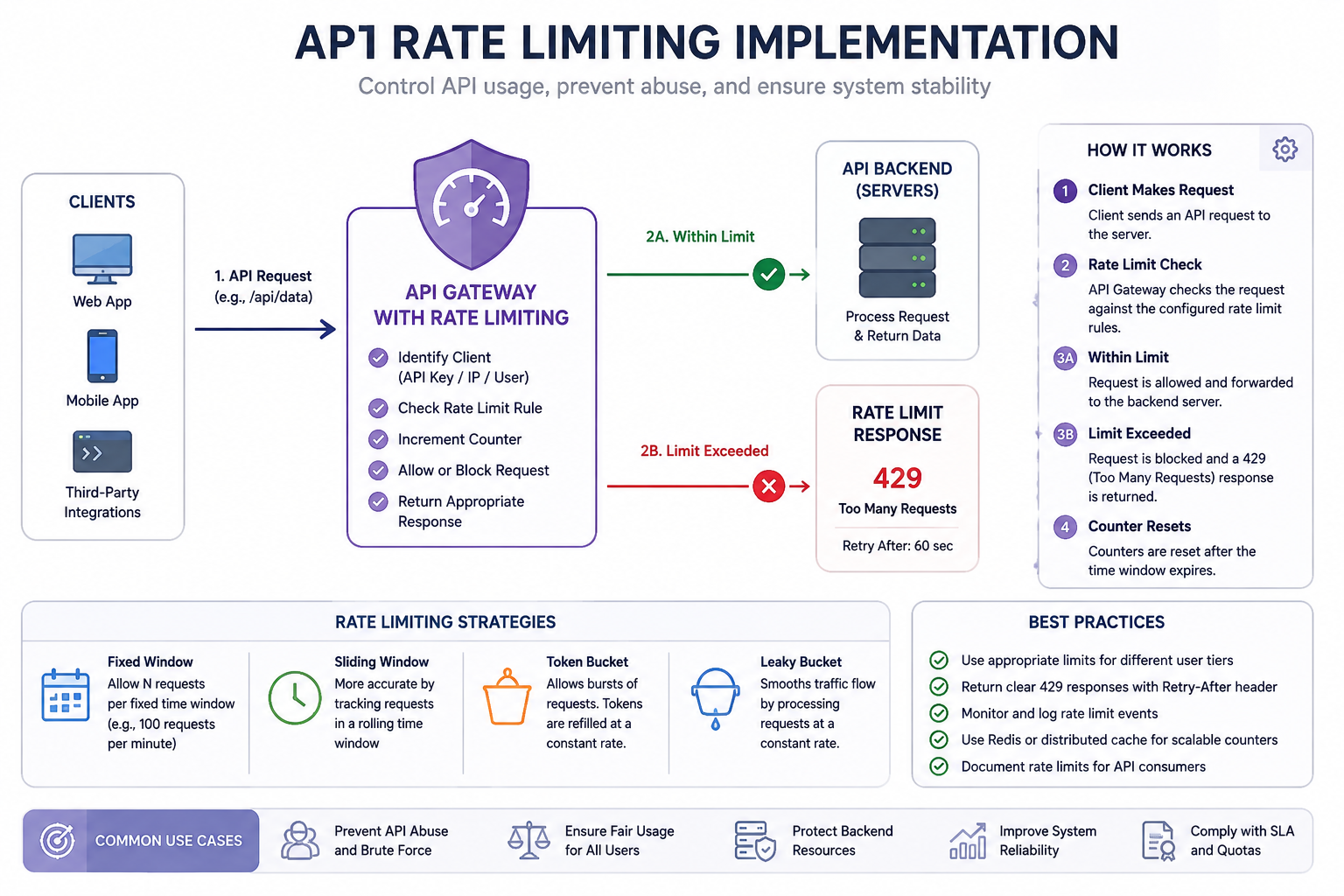
Modern APIs can receive thousands or millions of requests every day. Without proper controls, a sudden traffic spike, abusive client, bot, or poorly designed application can consume excessive server resources and affect legitimate users. API rate limiting implementation provides a practical way to control request volume while protecting application performance, availability, and infrastructure costs.
A typical policy might allow an API key to make 100 requests per minute. Requests within that limit are processed normally; once the limit is exceeded, the API can return HTTP 429 Too Many Requests and tell the client when to retry. Effective rate limiting, however, involves more than adding a simple counter. Developers must choose an algorithm, identify clients, decide where limits should be enforced, handle distributed systems, and monitor the results.
What Is API Rate Limiting?
API rate limiting is a technique that restricts how frequently a client can access an API during a defined period. A limit might be based on an IP address, authenticated user, API key, tenant, endpoint, or combination of these identifiers.
For example, an API could allow 60 requests per minute per API key. The 61st request may be rejected until the relevant time window resets. This protects backend services from excessive traffic while creating predictable usage for API consumers.
Rate Limiting vs Throttling vs Quotas
These terms are related but aren't identical.
Understanding these differences helps you select the right control for each API.
Why Do APIs Need Rate Limiting?
A well-designed rate limiter protects both the application and its users. It can prevent a single client from consuming disproportionate resources and help maintain consistent performance during traffic spikes.
Rate limiting also contributes to API security. Login, password-reset, search, and other sensitive endpoints can be targeted by automation, credential stuffing, enumeration, or scraping. A rate limiter can reduce the speed of such activity, although it should be treated as one security layer rather than a replacement for authentication, authorization, WAF, bot management, or DDoS protection.
How Does API Rate Limiting Work?
The basic request flow is straightforward:
Client → API Gateway/Middleware → Rate Limiter → Counter/Store → Allow or Reject → Application
When a request arrives, the system identifies the client and determines which policy applies. It then checks the client's current usage against the configured limit.
If the request is allowed, the limiter updates its state and passes the request to the application. If the limit has been exceeded, the API rejects the request, normally with a 429 Too Many Requests response.
Example
Suppose /api/products allows 100 requests per minute per API key.
Requests 1–100: allowed
Request 101: rejected
Response: 429 Too Many Requests
Client receives retry information
The exact behavior depends on the algorithm being used.
API Rate Limiting Algorithms Explained
Choosing the right algorithm is one of the most important parts of API rate limiting implementation. There is no single algorithm that works perfectly for every application.
Fixed Window
Fixed window divides time into predefined periods, such as one-minute intervals. A counter records requests during each window and resets when the next window begins.
It is easy to implement and inexpensive, making it suitable for straightforward APIs. Its weakness is the boundary problem: a client may send many requests at the end of one window and many more immediately after the next window starts.
Sliding Window
A sliding window evaluates requests over a continuously moving period. It provides better control around window boundaries and can produce fairer limits.
The trade-off is greater implementation complexity and potentially more state than a basic fixed-window counter.
Token Bucket
The token bucket algorithm maintains a bucket containing tokens. Tokens are replenished at a defined rate, and each request consumes a token.
Its major advantage is controlled bursting. For example, a service could refill 10 tokens per second while allowing a bucket capacity of 50. A client can temporarily send a burst of requests when tokens are available without exceeding the overall refill rate.
Leaky Bucket
The leaky bucket approach processes traffic at a controlled rate. Instead of allowing large bursts through immediately, requests can be queued and released at a steady pace.
It works well when downstream services need predictable traffic rather than sudden spikes.
Sliding Log
A sliding log records individual request timestamps and removes entries outside the active window. This provides highly accurate enforcement but can require more memory and processing than simpler approaches.
How to Choose the Right Rate Limit
Before implementing a limiter, determine what you're protecting and what legitimate traffic looks like.
For a simple public API, a fixed window may be enough. APIs that experience legitimate bursts may benefit from a token bucket. Applications requiring smoother traffic can consider a leaky bucket, while highly precise controls may justify a sliding-window approach.
Also consider the cost of each endpoint. A cheap read operation should not necessarily have the same limit as a computationally expensive search, payment, or report-generation endpoint.
What Should You Rate Limit?
The rate-limit key determines whose requests are counted together.
By IP Address
IP-based limits are useful for anonymous APIs and basic abuse protection. However, many users can share one public IP through NAT, corporate networks, mobile carriers, or VPNs, which can create false positives.
By User
Authenticated APIs can associate limits with a user account. This often provides better fairness because each user receives an independent allowance.
By API Key
API keys are particularly useful for developer platforms and partner APIs. Each integration can receive its own usage policy.
By Endpoint
Expensive endpoints can receive stricter limits. For example:
/products: 300 requests/minute
/search: 60 requests/minute
/login: 10 requests/minute
/reports: 20 requests/minute
For sophisticated systems, a composite key such as user_id + endpoint can provide even more precise control.
Where Should API Rate Limiting Be Implemented?
Rate limiting can operate at several layers.
For a small application, middleware with an in-memory counter may be sufficient. However, once an API runs across multiple servers, local counters can become inconsistent.
Imagine five API servers, each allowing 100 requests per minute. If each server maintains its own counter, a client could potentially receive far more than the intended global limit. A centralized store such as Redis can allow those instances to enforce a shared policy.
API Rate Limiting Implementation Step by Step
A reliable implementation starts with a clear policy rather than code.
Step 1: Define the Limit
Specify the identity, request budget, and time period.
For example:
100 requests per minute per authenticated API key.
Step 2: Choose an Algorithm
Select fixed window, sliding window, token bucket, or another method based on traffic behavior and accuracy requirements.
Step 3: Choose the Storage
A single-server application might use local memory. Distributed applications generally need shared state, such as Redis.
Step 4: Perform the Rate-Limit Check
The basic logic looks like this:
identify client
load current limit state
calculate allowance
if request is allowed:
update state
continue request
else:
return HTTP 429
The check should ideally occur before expensive operations such as unnecessary database queries or external service calls.
Step 5: Return Useful Headers
Tell clients how much capacity remains and when they can try again.
A typical rejected response could look like:
HTTP/1.1 429 Too Many Requests
Retry-After: 30
Content-Type: application/json
Implementing Rate Limiting With Redis
Redis is a strong option when multiple application instances need to share rate-limit state. It provides fast key-value operations, expiration, and mechanisms for atomic rate-limit logic.
A simple fixed-window design might conceptually use:
INCR request counter
check current count
set expiration
allow or reject request
However, production implementations need to consider concurrency. A naive GET → calculate → SET sequence can create race conditions when multiple requests arrive simultaneously.
Atomic operations or server-side scripting can help ensure that checking and updating the limit happen as one consistent operation.
For a distributed API, a typical architecture is:
Client → Load Balancer → API Servers → Redis Rate Limiter → Application Services
This avoids treating every application server as an isolated rate limiter.
Handling HTTP 429 Too Many Requests
When a client exceeds its rate limit, 429 Too Many Requests is the appropriate HTTP status for indicating that the request cannot be served because the client has sent too many requests.
A useful response can include:
{
"error": "rate_limit_exceeded",
"message": "Too many requests. Try again later."
}
The Retry-After header can communicate when the client should retry.
Common rate-limit headers also include:
X-RateLimit-Limit
X-RateLimit-Remaining
X-RateLimit-Reset
These X-RateLimit-* names are common conventions, not universal HTTP requirements, so document your API's behavior clearly.
How Clients Should Handle Rate Limits
A client should not immediately retry a request after receiving 429. Repeating requests too quickly can make congestion worse.
Instead, clients should use exponential backoff and, where appropriate, randomized jitter. Jitter prevents thousands of clients from retrying at exactly the same moment.
For example, if 10,000 clients receive a retry delay of 60 seconds and all retry at exactly 60 seconds, the API may experience another sudden traffic spike. Randomized retry timing spreads that load.
Tiered API Rate Limits
Many SaaS platforms use different limits for different customer plans.
Tiered limits can support fair resource allocation while allowing high-value customers to access larger API capacity.
You can also combine plan-based policies with endpoint-specific limits. A premium account may receive more requests overall but still have a strict limit on particularly expensive operations.
Testing an API Rate Limiting Implementation
Do not test only whether the API eventually returns 429. Test the entire policy.
Tools such as Postman can help generate repeated requests and inspect status codes, response bodies, and rate-limit headers.
Common API Rate Limiting Mistakes
One common mistake is relying exclusively on IP addresses. Shared networks can cause legitimate users to consume the same allowance.
Another is using local memory in a distributed deployment. Each server may maintain a different view of the client's usage.
Developers should also avoid non-atomic counter updates, arbitrary limits, unlimited client retries, and returning generic server errors instead of a clear 429 response.
Finally, don't apply the same limit to every endpoint without considering cost and business importance.
What Happens If Redis Goes Down?
Distributed rate limiting introduces an important operational decision: what should happen when the shared rate-limit store is unavailable?
A fail-open approach allows traffic to continue, prioritizing availability but potentially allowing abuse. A fail-closed approach blocks traffic when the limiter cannot verify the request, prioritizing protection but risking an outage.
Some systems use a local fallback limiter to provide partial protection. The appropriate strategy depends on the API's availability, security requirements, and acceptable failure mode.
API Rate Limiting Best Practices
For production systems:
Choose limits based on real traffic data.
Use the right client identifier.
Apply stricter policies to expensive endpoints.
Use shared state for distributed deployments.
Make counter updates atomic.
Return HTTP 429 when limits are exceeded.
Provide useful retry information.
Use exponential backoff and jitter on clients.
Monitor rejected requests.
Document limits clearly.
Test concurrency and boundary conditions.
Define behavior for rate-limiter failures.
API Rate Limiting Use Cases
Rate limiting can be adapted to many API scenarios.
Authentication: Restrict login attempts to slow credential attacks.
Public APIs: Give each API key a predictable request allowance.
Payment systems: Apply strict controls around sensitive and expensive operations.
SaaS applications: Give each tenant an independent request budget.
Search APIs: Limit resource-intensive queries more aggressively than simple reads.
AI APIs: Apply limits based on requests, tokens, cost, or a combination of these measurements.
Remember that rate limiting is only one component of API security. Strong authentication, authorization, input validation, logging, monitoring, and other security controls remain important.
API Rate Limiting Implementation by Framework
The underlying principles remain the same regardless of programming language.
Python
For an API rate limiting implementation in Python, developers can use framework middleware or dependencies and connect the limiter to Redis when multiple application instances need shared state.
REST API
A REST API rate limiting implementation typically applies limits through middleware, an API gateway, reverse proxy, or service layer. The important decisions are the identifier, algorithm, storage, and response behavior.
C#
For a rate limiting implementation in C#, the limiter can be integrated into the application's request pipeline. ASP.NET Core also provides built-in rate-limiting capabilities that can be configured according to the application's policies.
API Gateway
An API rate limiting implementation in an API gateway can enforce policies before traffic reaches application servers. This is particularly useful when several backend services need centralized protection.
Conclusion
Effective API rate limiting implementation is more than counting requests. A production-ready solution combines the right algorithm, client identification, shared storage, HTTP 429 handling, retry behavior, monitoring, and clearly documented policies.
For simple APIs, a basic limiter may be enough. Distributed applications often need centralized state such as Redis, while high-value or expensive endpoints may require different limits from ordinary requests. Start with measurable traffic patterns, test edge cases, and adjust policies as your API evolves.
The goal is not simply to reject traffic. It is to protect resources while keeping legitimate API consumers fast, predictable, and reliable.
Frequently Asked Questions
What is API rate limiting implementation?
API rate limiting implementation is the process of controlling how many requests a client can make within a defined period. It involves selecting an algorithm, identifying clients, storing request state, enforcing limits, and handling rejected requests.
How do I implement rate limiting in an API?
Define the limit, select an algorithm, identify the client, choose storage, add rate-limit middleware or gateway rules, return 429 responses when necessary, and test the behavior under normal and burst traffic.
What is the best algorithm for API rate limiting?
There is no universal best algorithm. Fixed windows are simple, token buckets handle bursts well, sliding windows provide stronger fairness, and leaky buckets are useful for smoothing traffic.
Can Redis be used for API rate limiting?
Yes. Redis is commonly used as shared rate-limit storage for distributed applications because multiple API servers can access the same state.
What HTTP status code indicates rate limiting?
429 Too Many Requests indicates that the client has sent too many requests within the applicable policy.
Should rate limiting use an IP address or API key?
It depends on the API. IP-based limits are useful for anonymous traffic, while API keys or authenticated user IDs generally provide better control for developer and authenticated APIs.
How can I prevent clients from repeatedly hitting a rate limit?
Return clear retry information and encourage clients to use exponential backoff with jitter. This reduces unnecessary retries and prevents synchronized retry spikes.
Leave a Reply