

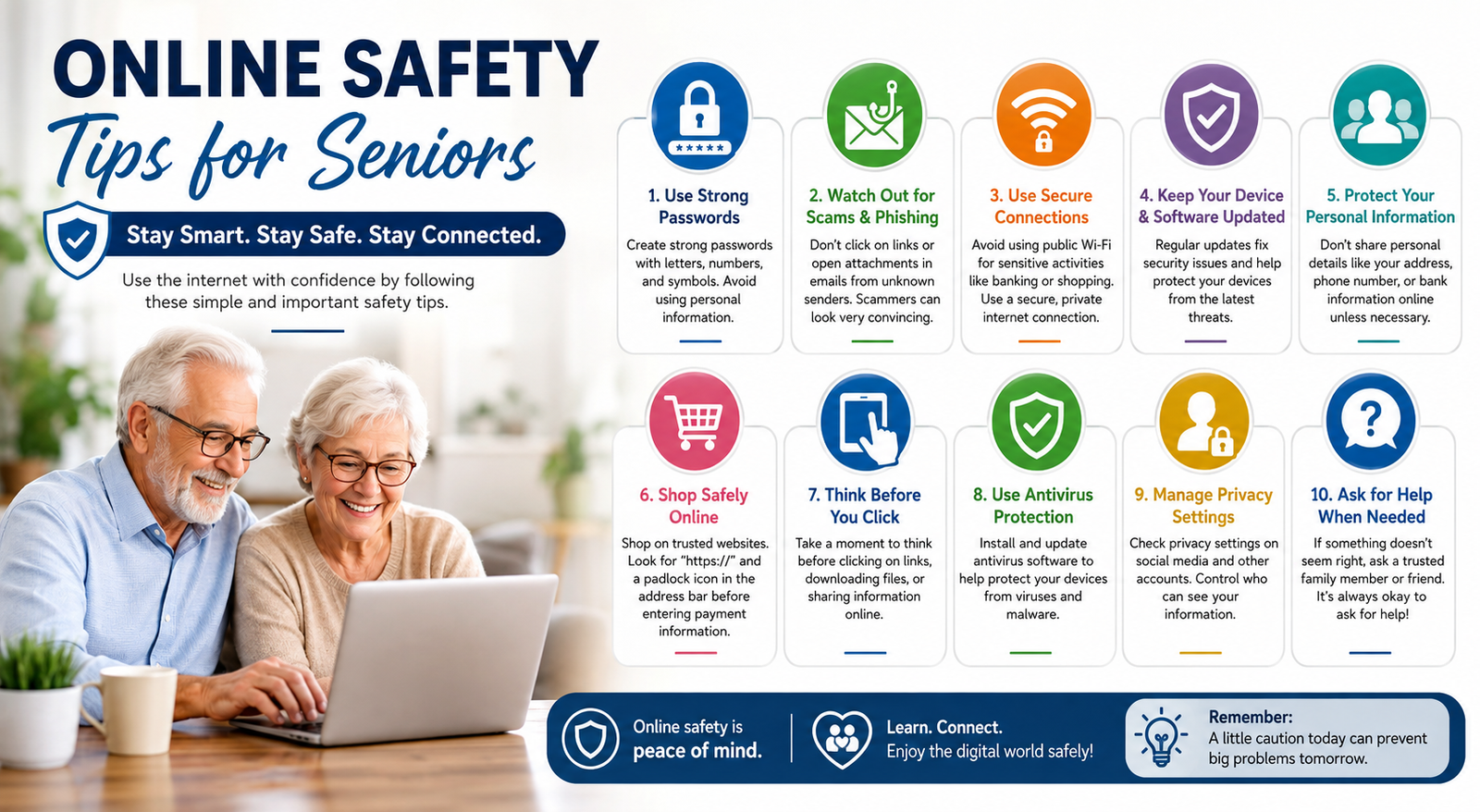
The internet makes life easier for millions of older adults. You can pay bills, talk to family, shop for groceries, watch videos, and manage health appointments without leaving home. Unfortunately, cybercriminals know this too. Seniors are often targeted because scammers believe they may be more trusting, less familiar with technology, or financially stable.
The good news is that you do not need to be a computer expert to stay safe online. By learning a few online safety basics and building simple habits, you can protect your money, identity, and personal information. This guide explains practical online safety tips for seniors in plain language, with real examples and easy steps anyone can follow.
Many libraries, community centers, and nonprofit organizations also offer free cyber security training for seniors, along with downloadable resources such as an Internet safety for seniors PDF or an Internet Safety for seniors PowerPoint presentation for workshops.
Why Online Safety Is Important for Seniors
Older adults are increasingly using smartphones, tablets, and laptops for everyday tasks. At the same time, reports from cybersecurity organizations show that seniors lose billions of dollars each year to online scams and fraud.
Scammers often use emotional pressure, fear, or urgency. They may pretend to be:
A bank representative
Medicare or Social Security
A grandchild in trouble
Technical support
A charity
An online retailer
Even a single click on a fake link can expose passwords or financial information. Understanding these risks is the first step toward staying safe online.
Example
Imagine receiving an email that says:
“Your bank account has been suspended. Click here immediately to verify your information.”
The message looks real and includes the bank’s logo. However, the link goes to a fake website designed to steal your password. This is called phishing, and it is one of the most common online threats.
The Most Common Online Threats Seniors Face
Cybercriminals use many tricks, but a few scams appear again and again.
Recognizing these scams makes it much easier to avoid them.
Essential Online Safety Tips for Seniors
Use Strong Passwords
Create passwords that are at least 12 characters long and include a mix of letters, numbers, and symbols. Avoid using birthdays, names, or simple words.
Good example: BlueRiver!82Sunset
Never Reuse Passwords
If one website is hacked, criminals often try the same password on other accounts. Use a different password for banking, email, shopping, and social media.
Enable Two-Factor Authentication
Two-factor authentication (2FA) adds an extra layer of security. After entering your password, you receive a code on your phone or email. Even if someone steals your password, they usually cannot access your account without that code.
Keep Devices Updated
Install updates for your computer, phone, tablet, and apps as soon as they are available. Updates often fix security problems that hackers exploit.
Install Antivirus Software
A trusted antivirus program can detect malware, dangerous downloads, and suspicious websites. Make sure it updates automatically.
Avoid Clicking Suspicious Links
If an email, text, or social media message asks you to click a link, pause first. Ask yourself:
Was I expecting this message?
Does the sender look legitimate?
Is the message trying to scare or rush me?
When in doubt, go directly to the company’s official website instead of clicking the link.
Verify Phone Calls
Scammers can fake caller ID numbers. If someone claims to be from your bank or a government agency, hang up and call the official number printed on your card or statement.
Never Share Verification Codes
Banks and legitimate companies will not ask for a one-time security code over the phone. If someone asks for it, it is almost certainly a scam.
How to Recognize a Phishing Email
Phishing emails are designed to look real. Here are the most common warning signs.
Quick Check
Before clicking any link:
Hover your mouse over the link to see the real web address.
Look for misspellings such as amaz0n.com instead of amazon.com.
Be cautious of attachments you did not expect.
Safe Online Banking Tips for Seniors
Online banking is convenient, but it requires extra care.
Use your bank’s official app or website.
Turn on transaction alerts so you are notified of withdrawals or purchases.
Check your accounts regularly for unfamiliar activity.
Avoid banking on public Wi‑Fi networks.
Log out when you finish, especially on shared devices.
Example
If you receive a text saying, “Your debit card has been locked,” do not click the link. Open your banking app directly or call the bank using the number on the back of your card.
Safe Online Shopping Tips
Shopping online can save time and money, but fake stores are common.
Buy from well-known retailers whenever possible.
Look for https:// and a padlock icon in the browser.
Read customer reviews.
Avoid deals that seem unbelievably cheap.
Use a credit card rather than a debit card when possible, since credit cards often provide better fraud protection.
Red Flag
A website selling a $1,000 television for $99 is likely a scam.
Social Media Safety Tips
Facebook, Instagram, and other social networks help people stay connected, but scammers use them too.
Accept friend requests only from people you know.
Be careful with quizzes and games that ask personal questions.
Do not share your full birth date, address, phone number, or travel plans publicly.
Ignore messages claiming you won a prize if you never entered a contest.
Common Scam
A scammer creates a fake profile using a family member’s photo and sends a message asking for money. Always verify through a phone call or another trusted method.
Smartphone and Tablet Security
Your mobile devices contain photos, contacts, banking apps, and personal information.
Use a PIN, fingerprint, or Face ID.
Download apps only from the Apple App Store or Google Play Store.
Review app permissions and deny access that seems unnecessary.
Turn on “Find My iPhone” or “Find My Device” so you can locate or erase a lost phone.
Public Wi‑Fi Safety
Free Wi‑Fi at airports, cafés, and hotels is convenient, but it is not always secure.
Safer Habits
Avoid banking or shopping on public Wi‑Fi.
Use your mobile data connection for sensitive tasks.
Turn off automatic Wi‑Fi connections.
Consider using a VPN if you frequently use public networks.
Passwords vs. Passkeys
Many websites now offer passkeys, which are a newer and safer alternative to passwords.
If a trusted service offers passkeys, they are often the safer choice.
Password Managers Explained
Remembering dozens of strong passwords is difficult. A password manager securely stores your passwords and fills them in automatically when you visit a website.
Benefits
Creates strong passwords for you
Stores them in one secure place
Reduces the temptation to reuse passwords
Saves time when logging in
Choose a well-known password manager with good security reviews. Protect it with a strong master password and enable two-factor authentication.
Many organizations that publish online safety articles also provide free online safety tips for seniors PDF downloads that explain password managers step by step. If you prefer printed materials, search for an Online safety tips for seniors pdf or Internet safety for seniors PDF from a trusted government or nonprofit source.
AI Scams Targeting Seniors in 2026
Artificial intelligence has introduced new challenges for internet users, especially older adults. Cybercriminals now use AI tools to create realistic fake voices, emails, images, and videos that make scams more convincing.
For seniors, learning about these modern threats is an important part of online safety basics. AI scams often rely on emotions like fear, urgency, and trust. Understanding how these scams work can help older adults identify risks and avoid becoming victims.
AI Voice Cloning Scams
AI voice cloning allows scammers to create a realistic copy of a person's voice using artificial intelligence. Criminals may collect voice samples from social media videos or public recordings and use them to create fake emergency calls.
Example of an AI Voice Scam
A senior receives a phone call that sounds like a family member:
“I’m in trouble and need money immediately. Please help me.”
Although the voice sounds familiar, it may not be real. The scammer is using AI-generated audio to create a sense of urgency.
How to Protect Yourself From Voice Cloning Scams
Call the person back using their saved contact number.
Ask a personal question only they would know.
Create a family emergency verification phrase.
Never send money because of an unexpected urgent call.
AI-Generated Phishing Emails
AI has made phishing emails more difficult to recognize. Scammers can now create professional-looking messages that appear to come from banks, companies, or government organizations.
Warning Signs of AI Phishing Emails
Unexpected requests for personal details
Urgent messages demanding immediate action
Requests for passwords or security codes
Suspicious attachments
Links leading to unknown websites
Always verify the sender before clicking anything. If an email claims to be from a company, visit the official website manually instead of using the email link.
Deepfake Videos and Fake Images
Deepfake technology allows criminals to create fake videos and images that look realistic. These fake materials may be used to promote scams, fake investments, or false emergency situations.
Ways to Identify Deepfake Content
Check where the video originally came from.
Look for information from trusted sources.
Avoid sharing shocking content without verification.
Be careful with investment videos or celebrity promotions.
What to Do If You Have Been Scammed Online
Being targeted by a scam can happen to anyone. The most important step is taking quick action. The faster you respond, the better chance you have of limiting the damage.
Stop Contact With the Scammer
Immediately stop communicating with suspicious individuals. Do not reply to additional messages, answer repeated calls, or send more information.
Block the scammer’s:
Phone number
Email address
Social media account
Avoid trying to recover money by negotiating with the scammer because it may lead to further losses.
Contact Your Bank or Financial Institution
If you shared payment details or transferred money:
Contact your bank immediately.
Explain the situation clearly.
Ask whether transactions can be reversed.
Request extra security protection on your account.
Banks can often provide guidance on the next steps after fraud.
Change Your Passwords and Secure Accounts
If a scammer accessed your account information, update your passwords immediately.
Focus on important accounts such as:
Email
Online banking
Shopping accounts
Social media
Use unique passwords and enable two-factor authentication for additional protection.
Scan Your Device for Security Problems
If you clicked a suspicious link or downloaded an unknown file:
Run a security scan.
Remove suspicious apps.
Update your operating system.
Check browser extensions.
Malware can sometimes remain hidden and continue collecting information.
Report the Scam
Reporting scams helps protect others and allows organizations to track cybercriminal activity.
You can report scams through:
Your bank
Online platforms
Consumer protection agencies
Local authorities
Daily Online Safety Checklist for Seniors
Building simple daily habits can greatly improve digital security. Seniors do not need advanced technical knowledge to stay protected.
Use this checklist:
✓ Keep your phone and computer updated
✓ Use strong and unique passwords
✓ Enable two-factor authentication
✓ Avoid clicking unknown links
✓ Check bank accounts regularly
✓ Review privacy settings
✓ Download apps from trusted stores
✓ Ignore unexpected money requests
✓ Verify suspicious phone calls
✓ Ask someone you trust when unsure
These simple steps are practical examples of free online safety tips for seniors that can help reduce common online risks.
How Family Members Can Help Seniors Stay Safe Online
Family members and caregivers can help seniors feel more confident while using technology. The goal should be education and support rather than creating fear.
Helping older adults understand online risks can make daily internet use safer.
Teach Scam Awareness
Explain common scams using simple examples. Show seniors how fake emails, suspicious messages, and fraudulent websites work.
Discuss new scam methods regularly because cybercriminals constantly change their tactics.
Help Set Up Security Features
Family members can assist seniors with:
Creating strong passwords
Setting up two-factor authentication
Installing updates
Adjusting privacy settings
Choosing secure applications
These steps provide extra protection without making technology complicated.
Encourage Cybersecurity Learning
Many organizations provide educational resources, including free cyber security training for seniors. These programs often include workshops, online lessons, and downloadable guides.
Useful learning resources include:
Online safety articles
Online safety tips for seniors pdf
Internet safety for seniors PDF
Internet Safety for seniors PowerPoint
These materials can help seniors understand cybersecurity in a simple and practical way.
Online Safety Basics Every Senior Should Remember
The internet offers many benefits, including staying connected with family, managing finances, shopping, and accessing important services.
However, safe internet use requires awareness and good habits.
Important rules for staying safe online include:
Think before clicking.
Verify unexpected messages.
Protect personal information.
Never share passwords or security codes.
Use trusted websites.
Keep devices updated.
Ask for help when something feels suspicious.
Small security habits can make a big difference in preventing online fraud.
Conclusion
The internet can make life easier, but seniors need to stay aware of changing online threats. Learning about phishing, AI scams, password security, and privacy protection helps older adults use technology with confidence.
The key to staying safe online is simple: slow down, verify information, and avoid making quick decisions under pressure.
With the right knowledge and security habits, seniors can enjoy the benefits of the digital world while keeping their personal information and finances protected.
Frequently Asked Questions About Online Safety for Seniors
What Are the Best Online Safety Tips for Seniors?
The best online safety tips for seniors include using strong passwords, enabling two-factor authentication, avoiding suspicious links, protecting personal information, and keeping devices updated.
Why Are Seniors Often Targeted by Online Scammers?
Seniors are often targeted because criminals try to steal personal information, financial details, or account access. Awareness and cybersecurity education can significantly reduce these risks.
How Can Seniors Identify a Phishing Email?
Seniors should look for suspicious sender addresses, urgent requests, unknown links, unexpected attachments, and messages asking for personal information.
Is Online Banking Safe for Seniors?
Yes, online banking is safe when seniors use official banking apps, enable security features, avoid public Wi-Fi, and regularly monitor account activity.
Are Password Managers Safe for Seniors?
Yes, trusted password managers can improve online security by creating and storing unique passwords for different accounts.
What Should Seniors Do After Clicking a Suspicious Link?
They should scan their device, change passwords, enable two-factor authentication, and monitor their accounts for unusual activity.
Where Can Seniors Find Free Cybersecurity Training?
Seniors can find free cyber security training for seniors through libraries, community programs, nonprofit organizations, and trusted cybersecurity websites.
Leave a Reply