

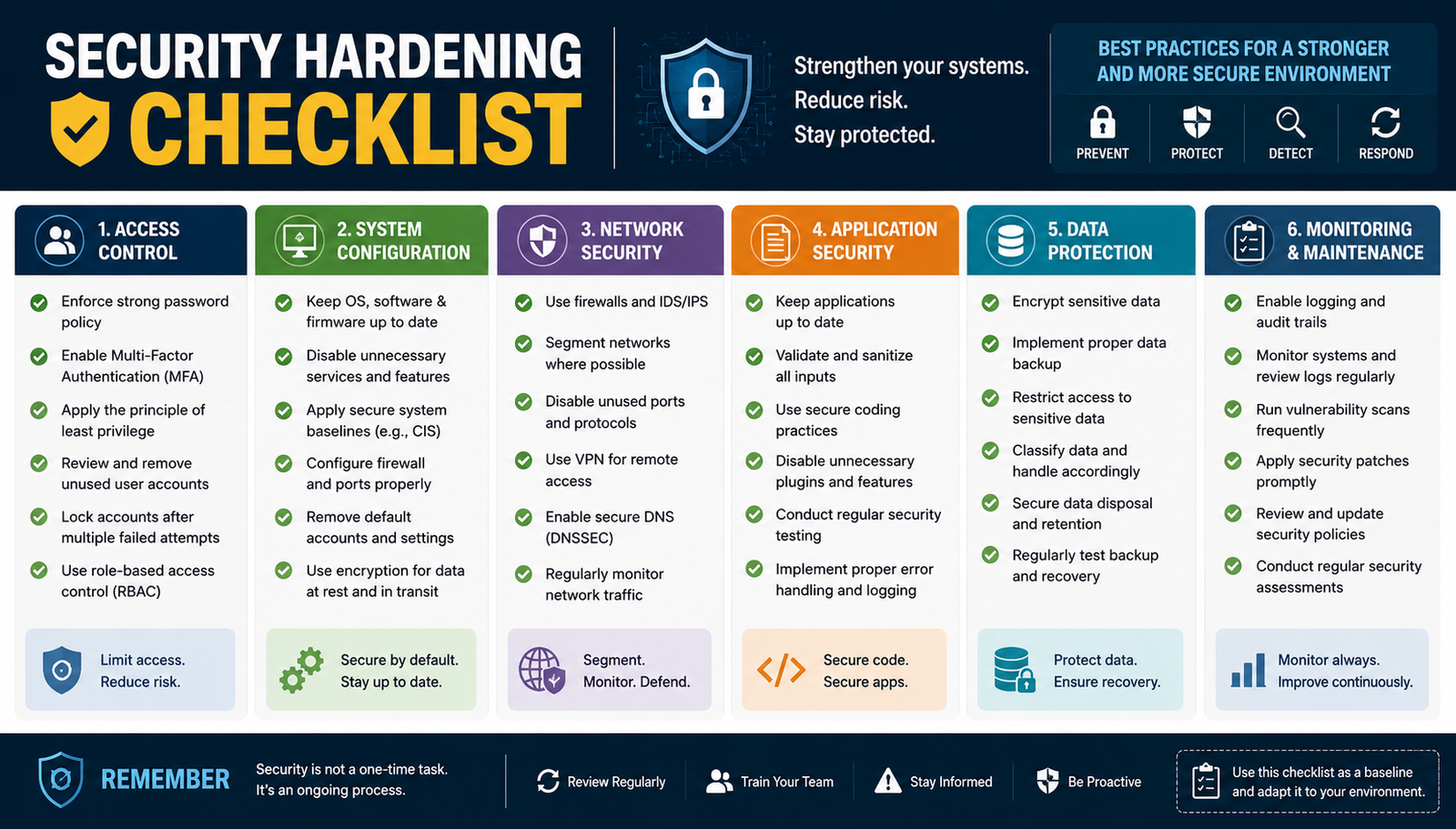
Security hardening is one of the most practical ways to reduce an organization's attack surface. Instead of waiting for a vulnerability or security incident, hardening focuses on removing unnecessary services, restricting access, strengthening configurations, protecting sensitive data, and continuously checking that secure settings remain in place.
A good security hardening checklist should be more than a list of security tips. It should tell you what to configure, why the control matters, how to verify it, and when the control should be reviewed again. NIST's current SP 800-70 Rev. 5 defines a security configuration checklist around these same principles: configuring technology for a specific risk posture, verifying the configuration, detecting unauthorized changes, and producing evidence of security posture.
This guide provides a practical checklist covering identity, networks, operating systems, Windows, Linux, servers, applications, databases, endpoints, cloud environments, encryption, backups, and monitoring.
What Is Security Hardening?
Security hardening is the process of changing a system's configuration to reduce unnecessary functionality, limit access, strengthen security controls, and make attacks more difficult. It can be applied to computers, servers, operating systems, applications, databases, network devices, cloud workloads, and endpoints.
The goal is not to make every setting as restrictive as possible. Effective hardening means creating an appropriate security baseline for the system's role and risk level, testing those changes, documenting them, and monitoring for configuration drift.
Security Hardening Checklist at a Glance
Use this quick security hardening checklist as a starting point before moving into the detailed recommendations:
Keep a copy of the completed checklist as evidence of your security posture. A checklist is considerably more useful when every control has an owner, status, verification method, and review date.
How to Prioritize Security Hardening Controls
Not every hardening task has the same urgency. Start with controls that prevent common attack paths, protect privileged access, reduce internet exposure, and address known weaknesses.
Critical controls should be addressed first, followed by high-priority controls and then environment-specific defense-in-depth improvements. This prevents teams from spending hours on low-impact configuration changes while an exposed administrative interface or unpatched server remains vulnerable.
A practical priority model is:
Critical: MFA, security patches, exposed services, privileged accounts, firewall protection
High: segmentation, encryption, logging, endpoint protection, secure remote access
Medium: configuration refinements, application restrictions, additional monitoring
Recommended: defense-in-depth controls based on business requirements
Identity and Account Security Hardening Checklist
Identity is often the first line of defense because compromised credentials can bypass many network-level controls.
Account Security
Remove unnecessary default accounts
Disable inactive accounts
Require strong authentication
Enable MFA
Apply least privilege
Review administrator memberships
Separate normal and administrative accounts
Remove unnecessary service-account privileges
Review accounts periodically
Rotate exposed or compromised credentials
For privileged access, consider role-based access control and just-in-time privileges where your environment supports them. An administrator should not have permanent access to every system simply because they may need it occasionally.
Patch and Update Management Checklist
Patching and hardening are related but different. Patching fixes known software vulnerabilities, while hardening reduces unnecessary exposure and insecure configuration.
Your checklist should include:
Install operating-system security updates
Update applications and dependencies
Update firmware where required
Remove unsupported software
Track vulnerable components
Prioritize critical security fixes
Establish an emergency patch process
Verify that patches were successfully installed
Maintain an inventory so you know which systems require updates. A server that nobody knows exists can easily become a forgotten security risk.
Network Security Hardening Checklist
Network hardening limits which systems can communicate and which services can be reached.
Firewall and Ports
Enable host-based firewalls
Review network firewall rules
Remove obsolete rules
Close unnecessary ports
Restrict inbound connections
Restrict administrative interfaces
Review outbound traffic where appropriate
Log important firewall events
Network Segmentation
Separate sensitive systems from ordinary user devices where practical. Databases, management interfaces, backup infrastructure, and critical servers should not automatically be reachable from every network segment.
For example, an internet-facing web server may need HTTPS access from the public internet, but its database should generally be reachable only from the application tier.
Operating System Hardening Checklist
Operating system hardening reduces unnecessary functionality and establishes a secure baseline.
Remove unnecessary software
Disable unused services
Configure the host firewall
Apply security updates
Restrict local administrator/root privileges
Secure remote administration
Configure auditing
Enable endpoint protection
Review file and directory permissions
Configure secure boot where supported
Synchronize system time
Monitor configuration changes
A useful rule is to keep only the services and capabilities the system actually needs for its intended role.
Windows Security Hardening Checklist
For Windows environments, use an established security baseline rather than creating hundreds of settings from scratch. Microsoft describes security baselines as recommended configuration settings designed to provide a standardized and well-tested starting point.
Check the following:
Enable Windows Firewall
Keep Windows fully patched
Configure Microsoft Defender or an appropriate EDR
Restrict local administrator access
Secure Remote Desktop
Disable unnecessary legacy protocols
Configure auditing
Review PowerShell activity and logging
Encrypt supported devices
Review local administrator memberships
Remove unnecessary services
Apply the appropriate Microsoft security baseline
For Windows Server 2025 specifically, Microsoft provides role-aware security baselines for domain controllers, member servers, and workgroup servers, with verification and drift-control capabilities. Microsoft also warns that baseline changes should be tested before production deployment.
Linux Security Hardening Checklist
Linux systems should be hardened according to their distribution, workload, and operational requirements.
Apply current security updates
Remove unnecessary packages
Disable unused services
Restrict SSH access
Disable direct root login where appropriate
Prefer strong SSH authentication
Restrict sudo privileges
Configure a host firewall
Enable SELinux or AppArmor where appropriate
Configure audit logging
Review file permissions
Remove unnecessary listening ports
Review scheduled tasks and services
For example, a Linux web server may require HTTP and HTTPS but have no reason to expose SSH to the entire internet. Restricting SSH to a trusted management network or VPN reduces unnecessary attack exposure.
Server Hardening Checklist
Server hardening should begin with understanding the server's role.
A database server, domain controller, web server, and file server should not necessarily have identical configurations.
Check:
Document the server's purpose
Remove unnecessary roles
Inventory running services
Review open ports
Restrict administrative access
Secure service accounts
Apply least privilege
Enable logging
Configure backups
Monitor configuration changes
Maintain a documented baseline
The one-server, one-purpose principle can help reduce unnecessary software and services when the architecture allows it.
Application and Web Server Hardening Checklist
Applications frequently contain default configurations that should be reviewed before production use.
Application Hardening
Change default credentials
Disable debug mode
Remove sample content
Remove unused modules
Protect application secrets
Restrict administrative interfaces
Update dependencies
Review configuration files
Apply secure permissions
Web Server Hardening
Force HTTPS where appropriate
Use modern TLS configurations
Configure relevant security headers
Disable directory listing when unnecessary
Reduce information disclosure
Restrict administrative endpoints
Review web-server permissions
Remove default pages and sample applications
Database Security Hardening Checklist
Databases contain valuable information, so unnecessary network and account access should be eliminated.
Remove or disable default accounts
Apply database security updates
Restrict database network access
Use dedicated application accounts
Apply least privilege
Encrypt sensitive connections
Protect database credentials
Monitor privileged activity
Secure database backups
Disable unnecessary database features
A common mistake is allowing a database to accept direct connections from the public internet when it only needs to communicate with an application server.
Encryption and TLS Hardening Checklist
Encryption protects information both while it is stored and while it travels between systems.
Use HTTPS/TLS for sensitive connections
Disable obsolete protocols where appropriate
Use trusted certificates
Monitor certificate expiration
Encrypt sensitive data at rest
Protect encryption keys
Avoid hard-coded secrets
Secure internal service communications where required
Modern security baselines increasingly focus on removing legacy protocols and enforcing stronger cryptographic configurations. Microsoft's current Windows Server 2025 baseline, for example, restricts TLS to 1.2 or higher and disables several legacy protocols.
Endpoint Security Hardening Checklist
Endpoints are common entry points for attackers, especially when users work remotely.
Install endpoint protection or EDR
Enable device encryption where appropriate
Remove unnecessary local administrator rights
Keep browsers and applications updated
Configure automatic updates
Apply screen-lock policies
Control removable devices where required
Monitor endpoint security events
Restrict unauthorized software
Secure remote-management tools
A remote employee's laptop, for example, should combine MFA, encryption, endpoint protection, patching, restricted privileges, and secure remote access rather than relying on antivirus alone.
Cloud Security Hardening Checklist
Cloud environments require special attention because a secure operating system can still be exposed through an incorrectly configured identity, storage bucket, security group, or cloud service.
Cloud IAM
Enable MFA
Apply least privilege
Remove unused identities
Rotate credentials
Limit permanent privileged access
Cloud Network and Storage
Restrict security groups
Minimize public exposure
Segment workloads
Block unintended public storage access
Encrypt sensitive cloud data
Enable relevant audit logs
CIS Benchmarks provide secure configuration recommendations across operating systems, cloud providers, network devices, databases, containers, and other technologies, making them useful references when developing a system hardening checklist.
Backup and Recovery Hardening Checklist
Backups should also be protected against unauthorized access and destructive attacks.
Maintain regular backups
Encrypt sensitive backups
Restrict backup permissions
Separate backup credentials
Maintain offline or immutable copies where appropriate
Monitor backup failures
Test restoration regularly
Protect backup management systems
A backup should not be considered reliable simply because a dashboard says “successful.” A restore test provides much stronger evidence that recovery will actually work.
Logging, Monitoring, and Configuration Change Detection
Hardening is not complete when a setting is changed. You also need to know whether that setting remains in place.
Monitor:
Authentication events
Privileged actions
Firewall activity
Configuration changes
New accounts
Service changes
Security alerts
Administrative activity
Important system events
A useful lifecycle is:
Configure → Verify → Monitor → Detect Change → Remediate
This approach aligns closely with NIST's current guidance, which emphasizes verification, identification of unauthorized configuration changes, documentation, and maintaining checklists throughout their lifecycle.
How to Verify Your Security Hardening
For every important control, use five steps:
Configure the security setting.
Verify that it works as intended.
Scan the system or configuration where appropriate.
Document the change and its owner.
Monitor for future configuration drift.
This verification layer is what separates a useful system hardening checklist from a simple collection of security advice.
Security Hardening Standards and Benchmarks
You do not need to invent every security setting yourself.
CIS Benchmarks provide prescriptive secure configuration recommendations for many technology families and are developed through a consensus-based cybersecurity process.
NIST provides guidance for developing, selecting, applying, testing, maintaining, and tailoring security configuration checklists. Its revised SP 800-70 Rev. 5 was published in May 2026 and expands guidance around cloud, IoT, AI systems, automation, traceability, and checklist lifecycle management.
Microsoft Security Baselines are particularly useful for Windows environments because they provide Microsoft-recommended configurations and explain their security implications.
Always tailor a benchmark to your environment and test changes before applying them broadly.
Common Security Hardening Mistakes
Avoid these common errors:
Hardening systems without understanding their role
Applying a benchmark without testing
Leaving default accounts active
Exposing administrative ports
Treating patching as the same thing as hardening
Ignoring configuration drift
Disabling security controls for convenience
Forgetting to test backups
Applying identical settings to every system
Never reviewing the baseline after infrastructure changes
The goal is not maximum restriction. The goal is an appropriate, defensible security posture that reduces risk without unnecessarily breaking business operations.
How Often Should You Perform Security Hardening?
Security hardening should be treated as a continuous process rather than a one-time project.
Review your baseline after major software upgrades, infrastructure changes, new vulnerabilities, new applications, cloud migrations, security incidents, and significant changes in business requirements.
A practical lifecycle is:
Assess → Harden → Verify → Monitor → Reassess
Maintaining the checklist is just as important as creating it. NIST's current guidance explicitly addresses checklist testing, documentation, maintenance, tailoring, and lifecycle management.
Security Hardening vs Related Security Practices
These practices complement one another. A hardened server can still contain a newly discovered vulnerability, while a fully patched server can remain unnecessarily exposed because of poor configuration.
Final Security Hardening Checklist
Before considering a system hardened, confirm that you have reviewed:
Identity and MFA
Privileged accounts
Patching
Firewall rules
Network exposure
Unnecessary services
Operating-system configuration
Windows or Linux-specific controls
Application configuration
Database security
TLS and encryption
Endpoint protection
Cloud permissions
Backup protection
Logging
Monitoring
Configuration verification
Security baseline documentation
Periodic reassessment
The best security hardening checklist is one that fits the actual system, can be verified, and is maintained over time. Start with the highest-risk controls, use authoritative baselines such as CIS, NIST, or vendor guidance, test changes before production deployment, and continuously monitor for configuration drift.
FAQs
What is a security hardening checklist?
A security hardening checklist is a set of configuration and verification tasks used to reduce a system's attack surface, restrict unnecessary access, strengthen security settings, and maintain an appropriate security baseline.
What should be included in a security hardening checklist?
It should cover identity and access, patching, firewalls, network exposure, operating systems, applications, databases, encryption, endpoints, cloud resources, backups, logging, monitoring, and configuration verification.
What are the most important security hardening steps?
Start with MFA, security updates, least privilege, firewall protection, removal of unnecessary services, restricted administrative access, encryption, logging, endpoint protection, and tested backups.
Is security hardening the same as patching?
No. Patching fixes known software vulnerabilities, while hardening strengthens configurations and reduces unnecessary attack surface. Both are important parts of a broader security program.
Are CIS Benchmarks a security hardening checklist?
CIS Benchmarks are secure configuration recommendations that can serve as a foundation for hardening checklists. The appropriate benchmark should be selected for the specific technology and tailored to the environment.
Can security hardening cause problems?
Yes. Restrictive settings can affect applications, compatibility, connectivity, or administrative workflows. This is why security baselines should be tested and tailored before production deployment. Microsoft specifically recommends careful testing of baseline changes before production use.
How often should a security hardening checklist be reviewed?
Review it continuously and reassess it after major technology changes, new vulnerabilities, security incidents, migrations, and changes to business requirements. At minimum, establish a recurring review schedule appropriate to the risk of the environment.
Leave a Reply