

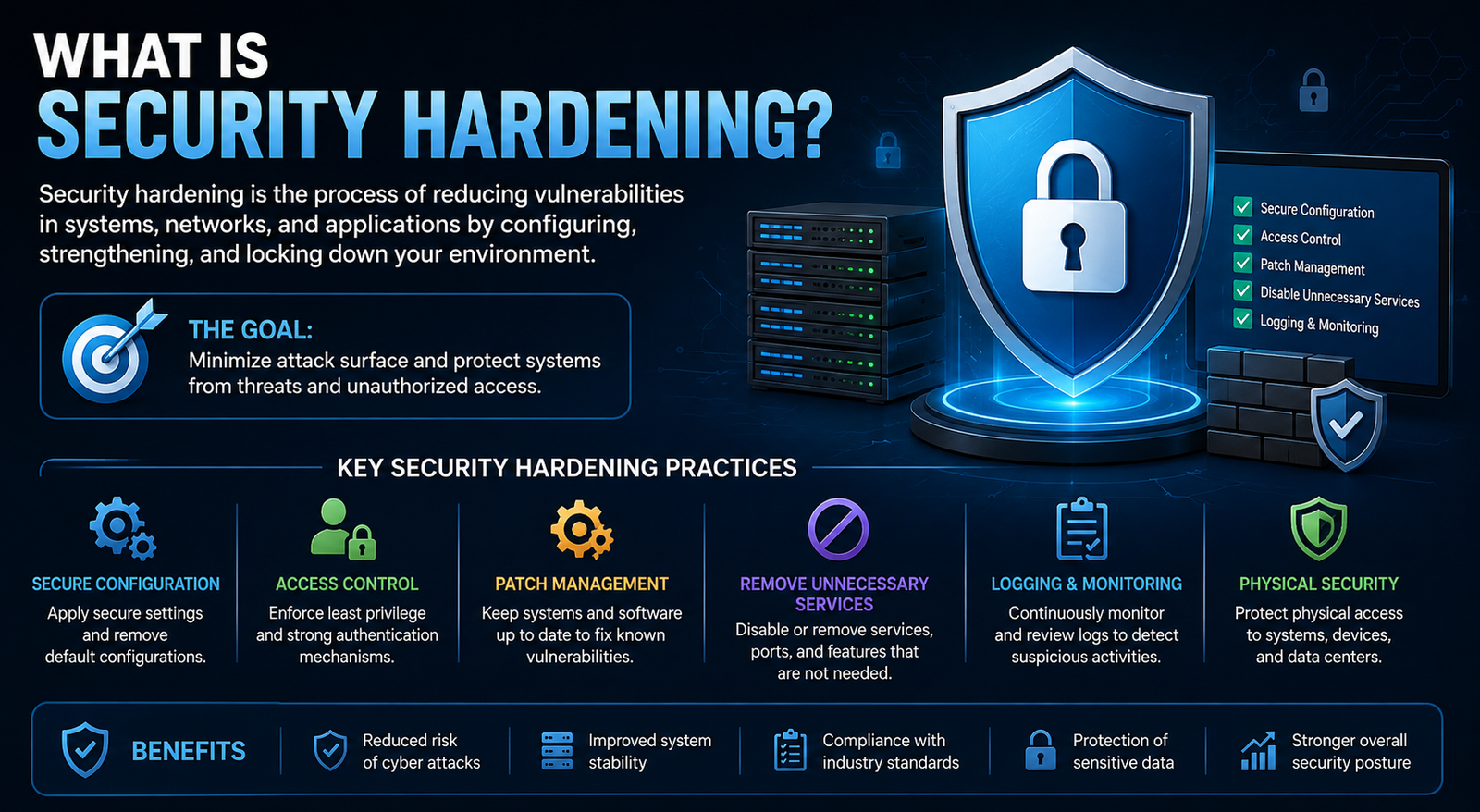
Security hardening is one of the most practical ways to reduce cybersecurity risk, yet the concept is often explained with overly technical language. What is security hardening? In simple terms, it is the process of making systems, devices, applications, networks, and accounts more secure by reducing unnecessary exposure and strengthening their configurations.
A hardened system has fewer unnecessary services, tighter access controls, safer default settings, current security updates, and appropriate monitoring. The goal is not to make a system impossible to attack. Instead, security hardening reduces the number of opportunities an attacker can exploit and makes unauthorized access more difficult.
Whether you manage a Linux server, Windows computer, cloud environment, database, or business network, security hardening can help create a stronger security baseline.
What Is Security Hardening?
Security hardening is the process of reducing a system's attack surface by removing unnecessary functionality, disabling insecure configurations, restricting access, applying security updates, and implementing appropriate security controls.
The concept applies to almost every part of an IT environment. Organizations can harden operating systems, servers, networks, applications, databases, cloud infrastructure, endpoints, containers, and user identities.
For example, a newly deployed server may have unnecessary services enabled, open network ports, excessive administrator privileges, and default configurations. Hardening involves reviewing those settings and changing them so the server exposes only what is required.
What Does Security Hardening Mean in Cybersecurity?
In cybersecurity, hardening means proactively reducing weaknesses before attackers can take advantage of them. Instead of waiting for suspicious activity or an incident, security teams configure systems according to a secure baseline and continuously review those configurations.
A simple analogy is securing a house. You might lock unused doors, remove spare keys, install stronger locks, close unnecessary windows, and add an alarm. Security hardening applies the same principle to technology: remove unnecessary entry points and strengthen the ones that must remain available.
Why Is Security Hardening Important?
The main purpose of security hardening is to reduce the attack surface. Every unnecessary service, exposed port, outdated application, excessive permission, or weak configuration can potentially create another opportunity for attackers.
Hardening can therefore reduce exposure to common security problems such as unauthorized access, malware infections, credential attacks, exploitation of vulnerable software, privilege escalation, and lateral movement.
Security hardening also helps organizations maintain consistent configurations across their environments. Instead of allowing every system to be configured differently, security teams can establish baselines and regularly verify whether systems continue to meet them.
Another important benefit is compliance. Security configuration standards and benchmarks can help organizations establish measurable security requirements for specific technologies.
How Does Security Hardening Work?
Security hardening generally follows a continuous cycle rather than a single configuration change.
1. Identify Assets
First, determine what needs protection. This includes servers, endpoints, applications, databases, cloud resources, accounts, network devices, and other technology assets.
2. Assess the Current Configuration
Review software versions, services, open ports, permissions, authentication settings, security controls, and other configurations. The goal is to identify unnecessary exposure and deviations from the desired baseline.
3. Establish a Secure Baseline
A baseline defines how a system should be configured. Organizations can use internal security policies or established guidance such as CIS Benchmarks and relevant NIST resources.
4. Apply Security Controls
Remove unnecessary services, patch vulnerabilities, strengthen authentication, restrict privileges, configure firewalls, encrypt sensitive information, and enable appropriate logging.
5. Test and Monitor
Hardening should be tested before being applied broadly. Organizations should then monitor systems for configuration changes, vulnerabilities, and security events.
6. Reassess Regularly
Security hardening is not a one-time project. New software, business requirements, vulnerabilities, and configuration changes can introduce new risks, creating the need for continuous review.
Types of Security Hardening
Security hardening can be applied at different layers of an IT environment.
Using several layers together provides stronger protection than relying on a single security control.
Common Security Hardening Techniques
Remove Unnecessary Software and Services
Unneeded applications and services increase the attack surface. If a service is not required, disabling or removing it can eliminate an unnecessary potential entry point.
Disable Unnecessary Ports and Protocols
Open ports should have a legitimate business or technical purpose. Network access should be restricted to what systems actually need.
Apply Security Patches
Outdated software can contain known vulnerabilities. Regular patching helps reduce exposure, although patching alone is not a complete hardening strategy.
Enforce Strong Authentication
Use strong authentication controls appropriate to the environment. Multi-factor authentication is particularly valuable for administrative and sensitive accounts.
Apply Least Privilege
Users and applications should receive only the permissions they need to perform their jobs. Limiting unnecessary administrative access can reduce the potential impact of a compromised account.
Encrypt Sensitive Information
Encryption helps protect sensitive data both while stored and while transmitted. Hardening should consider where encryption is appropriate and how encryption keys are protected.
Configure Firewalls
Firewalls can restrict unnecessary network communication and help limit which systems can communicate with particular services.
Enable Logging and Monitoring
A hardened environment still needs visibility. Security logs can help organizations identify suspicious authentication attempts, configuration changes, privilege escalation, and other events.
Change Default Configurations
Default usernames, passwords, permissions, services, and settings should be reviewed. Leaving unnecessary default configurations unchanged can create avoidable security risks.
Security Hardening Examples
The best way to understand security hardening is to look at practical examples.
Windows Hardening Example
A Windows system could be hardened by applying current security updates, enabling appropriate endpoint protections, configuring Windows Firewall, using standard user accounts where possible, protecting sensitive data with encryption, and enforcing strong authentication.
Linux Hardening Example
Linux hardening may include disabling unnecessary services, restricting SSH access, applying updates, configuring a firewall, using least-privilege accounts, implementing SELinux or AppArmor where appropriate, and monitoring system logs.
Network Hardening Example
A business network might have unnecessary management interfaces exposed to broader networks. Hardening could involve restricting administrative access, closing unnecessary ports, segmenting sensitive systems, and limiting communication between network zones.
Cloud Hardening Example
Cloud security hardening can include restricting public storage, enforcing least-privilege IAM permissions, enabling MFA, securing network rules, encrypting sensitive data, and monitoring configuration changes.
The exact configuration should always depend on the system's purpose and business requirements. Security settings should be tested before production deployment to avoid breaking legitimate functionality.
Security Hardening Standards and Frameworks
Organizations do not always need to create hardening requirements from scratch. Established security guidance can provide useful baselines.
CIS Benchmarks
CIS Benchmarks provide secure configuration recommendations for numerous technologies and environments. They can help security teams determine which settings should be reviewed and how systems can be configured more securely.
NIST Guidance
NIST provides cybersecurity guidance and resources that organizations can use when developing security configurations, baselines, and risk-management processes.
DISA STIGs
Security Technical Implementation Guides, commonly known as STIGs, provide detailed configuration guidance for specific technologies and environments, particularly where strict security requirements apply.
Standards should be treated as guidance rather than blindly applied settings. Organizations should evaluate requirements against their systems, operational needs, and risk tolerance.
How to Harden a System Step by Step
A practical security hardening process can follow these steps:
Inventory the system — identify hardware, software, accounts, services, and connections.
Assess current risks — look for outdated software, unnecessary services, excessive permissions, and insecure settings.
Choose a baseline — select an appropriate organizational or industry security baseline.
Remove unnecessary components — uninstall unused applications and disable unnecessary services.
Strengthen access controls — implement MFA and least privilege.
Patch the system — apply relevant security updates.
Restrict network access — configure firewalls and minimize unnecessary exposure.
Enable logging — collect security-relevant events.
Test changes — verify that security controls work without disrupting required functionality.
Monitor continuously — review changes and investigate configuration drift.
This process turns security hardening from a one-time configuration exercise into an ongoing security practice.
Security Hardening Checklist
Use this basic checklist when reviewing a system:
Inventory assets and software
Remove unnecessary applications
Disable unnecessary services
Close unnecessary ports
Change default credentials
Enable multi-factor authentication
Apply security patches
Enforce least privilege
Configure firewalls
Encrypt sensitive information
Secure remote administration
Enable security logging
Review permissions regularly
Monitor configuration changes
Test the hardened configuration
Reassess the system periodically
A checklist should be adapted to the specific operating system, application, network, or cloud environment rather than treated as a universal configuration.
Security Hardening vs Vulnerability Management vs Penetration Testing
These cybersecurity practices are related, but they have different purposes.
Security hardening therefore complements vulnerability management and penetration testing rather than replacing them.
Security Hardening in Modern IT Environments
Modern infrastructure extends beyond traditional servers and desktop computers.
Cloud environments require careful attention to identity permissions, public exposure, encryption, network controls, and configuration monitoring. Containers and Kubernetes environments may require minimal images, restricted privileges, secure secrets management, and controlled runtime permissions.
Identity is also increasingly important. Dormant accounts, excessive privileges, weak authentication, and poorly controlled administrative access can undermine otherwise strong system configurations.
Organizations using DevSecOps can incorporate hardening requirements into infrastructure-as-code templates, deployment pipelines, and automated configuration checks.
Common Security Hardening Mistakes
Treating Hardening as a One-Time Task
Systems change constantly. Software updates, new accounts, configuration changes, and deployments can introduce configuration drift.
Focusing Only on Patching
Patching is important, but hardening also involves access control, secure configuration, network restrictions, monitoring, and removing unnecessary functionality.
Giving Excessive Privileges
Administrative access should be limited to users and services that genuinely require it.
Applying Settings Without Testing
A security configuration can sometimes interfere with legitimate business functions. Test changes before applying them broadly, especially in production environments.
Ignoring Cloud and Identity
Modern security hardening should address identities, cloud resources, APIs, containers, and SaaS environments—not just traditional operating systems.
Best Practices for Maintaining a Hardened Environment
Start with a documented baseline and review it regularly. Automated configuration assessments can help identify systems that no longer match the desired standard.
Combine hardening with vulnerability management, patch management, access reviews, logging, monitoring, and security testing. This layered approach helps maintain protection as the environment changes.
Most importantly, document approved exceptions. Not every benchmark recommendation will be appropriate for every business system, so security teams should understand why deviations exist and evaluate their associated risks.
Conclusion
So, what is security hardening? It is the ongoing practice of reducing a system's attack surface and strengthening its security configuration. It can involve everything from removing unnecessary services and applying patches to enforcing least privilege, securing networks, protecting identities, and monitoring configuration changes.
Effective hardening is not about applying every possible security setting. It is about understanding the environment, establishing an appropriate baseline, testing changes, and continuously maintaining secure configurations.
Whether you're securing a Linux server, Windows endpoint, cloud environment, application, or business network, a structured security hardening process can provide an important layer of defense against modern cyber threats.
Frequently Asked Questions
What is security hardening in simple terms?
Security hardening means making a system more difficult to attack by removing unnecessary functionality, strengthening configurations, restricting access, applying updates, and implementing appropriate security controls.
Why is security hardening important?
Security hardening reduces the attack surface and can limit opportunities for unauthorized access, exploitation, privilege escalation, and other common attacks. It also helps organizations maintain consistent security configurations.
What are some security hardening examples?
Examples include disabling unnecessary services, closing unused ports, enabling MFA, applying security updates, enforcing least privilege, configuring firewalls, encrypting sensitive data, and monitoring security events.
What is a security hardening checklist?
A security hardening checklist is a set of configuration and security tasks used to review whether a system meets an organization's desired security baseline. It can include patching, access control, firewall configuration, logging, and removing unnecessary services.
What is the difference between security hardening and vulnerability management?
Security hardening focuses primarily on reducing exposure through secure configurations and controls. Vulnerability management focuses on identifying, prioritizing, and remediating vulnerabilities. The two practices work together.
Is security hardening a one-time process?
No. Security hardening should be continuous. Software, configurations, users, vulnerabilities, and business requirements change over time, so systems need periodic assessment and monitoring.
Can security hardening prevent cyberattacks?
Hardening cannot guarantee that an attack will never occur. However, reducing unnecessary exposure and strengthening security controls can make systems more difficult to compromise and can limit potential attack paths.
Leave a Reply