

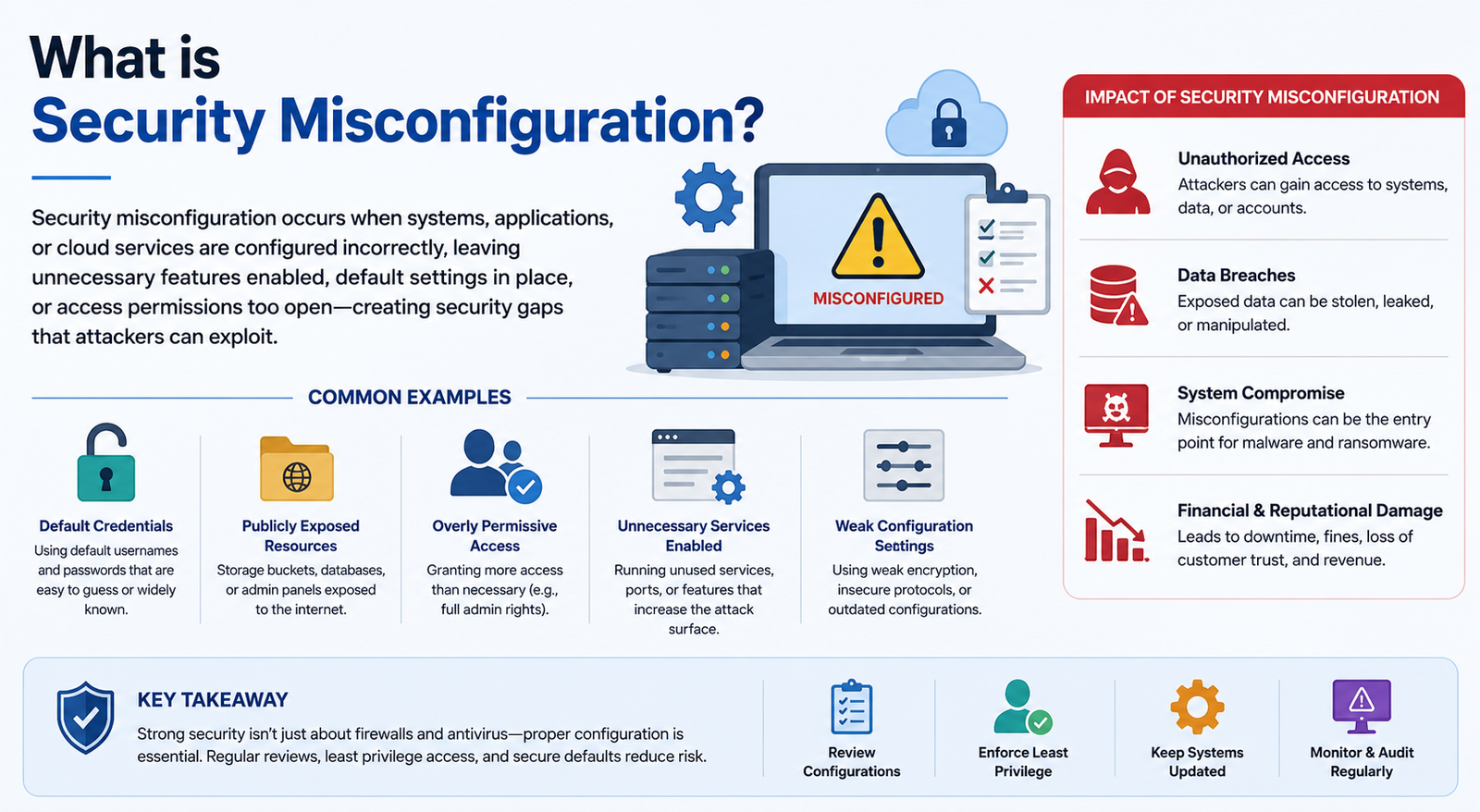
Security misconfiguration is one of the most common ways organizations unintentionally expose applications, servers, databases, cloud resources, and networks to attackers. It happens when a system is set up with insecure settings, unnecessary features, excessive permissions, default credentials, or other security controls that are missing or incorrectly configured.
If you are asking what is security misconfiguration in cyber security, think of it as a security problem caused by how a system is configured rather than necessarily by a flaw in its underlying software. For example, a cloud storage bucket that should be private may accidentally be made publicly accessible. The software can be working exactly as designed, but the configuration creates unnecessary exposure.
The issue is significant enough that OWASP Top 10:2025 ranks Security Misconfiguration as A02, moving it from fifth place in the 2021 edition to second place. OWASP also reports that every application tested in its 2025 dataset had some form of misconfiguration.
What Is Security Misconfiguration?
Security misconfiguration occurs when an application, server, cloud service, database, network device, or other technology is configured incorrectly from a security perspective. The result can be unnecessary exposure, unauthorized access, information disclosure, or another exploitable weakness.
Common examples include leaving default administrator credentials unchanged, exposing unnecessary ports, enabling directory listing, allowing overly broad cloud permissions, running debugging features in production, or failing to configure security headers. OWASP specifically identifies unnecessary features, default accounts, excessive error messages, insecure cloud permissions, and insecure server or framework settings as examples.
A useful way to understand the concept is:
Misconfiguration → Security weakness → Potential exploitation → Business impact
For instance, if a database is accidentally exposed to the public internet, the exposure is the configuration problem. An attacker attempting unauthorized access is the exploitation activity, while stolen customer information would represent the potential business impact.
How Does Security Misconfiguration Happen?
There is rarely one single cause. Modern organizations manage thousands of settings across cloud platforms, applications, endpoints, databases, containers, firewalls, and identity systems. A small configuration mistake can therefore create a significant security gap.
Default Settings and Credentials
Default configurations are convenient during installation but dangerous in production. Vendor-created accounts, sample applications, default passwords, and unnecessary services may remain active if administrators do not review them before deployment.
OWASP recommends minimal platforms and removing unnecessary features, components, documentation, samples, and frameworks that are not required.
Human Error
Administrators and developers can accidentally open a firewall port, grant excessive permissions, enable public access, or disable a security control while troubleshooting an issue.
These mistakes become particularly difficult to manage in large environments where configuration changes happen frequently.
Poor Change Management
A secure system can become insecure after a configuration change. If changes are not reviewed, tested, documented, and monitored, an organization may not realize that a previously secure setting has been weakened.
Configuration Drift
Configuration drift occurs when a system gradually moves away from its approved secure state. For example, a cloud administrator might temporarily make a storage resource public during testing and forget to restore the original restriction.
NIST's security-focused configuration management guidance emphasizes managing and monitoring system configurations to maintain adequate security and reduce organizational risk.
Common Types of Security Misconfiguration
Security misconfiguration can occur at almost every layer of an IT environment. The following examples cover some of the most common cases.
The important point is that a configuration can be functional without being secure. A service may operate normally while simultaneously exposing information or access that should have been restricted.
Security Misconfiguration Examples
Understanding a practical security misconfiguration example is often easier than memorizing definitions.
Public Cloud Storage
Imagine a company stores customer documents in cloud storage. The storage should only be accessible to authorized employees, but a permission setting accidentally allows public access.
The cloud service itself may not be defective. The problem is the access configuration. If sensitive files can be retrieved without authorization, the organization has created a serious exposure.
Default Administrator Password
Suppose an application is deployed with a default administrative account and the password supplied by the vendor is never changed.
An attacker who knows or guesses those credentials may gain administrative access. OWASP includes unchanged default accounts and passwords among its security misconfiguration scenarios.
Directory Listing
A web server may be configured to display the contents of directories when no index page is present. An attacker could discover filenames, compiled application components, backups, or other information that was never intended to be publicly visible.
OWASP specifically describes directory listing as an attack scenario in its A02:2025 guidance.
Detailed Error Messages
Detailed error messages can help developers troubleshoot applications, but they should not normally expose internal information to ordinary users.
If a production application returns stack traces, software versions, file paths, or database information, an attacker may gain useful information for further attacks.
What Are the Risks of Security Misconfiguration?
The consequences depend on what was misconfigured and how exposed the affected system is. A minor configuration error may have limited impact, while a publicly accessible database or cloud resource can become a major security incident.
Data Exposure
Incorrect permissions can expose customer information, credentials, financial records, source code, backups, or internal documents.
Unauthorized Access
Default credentials, exposed administrative interfaces, weak access controls, and public services can give attackers opportunities to access systems they should never reach.
Increased Attack Surface
Every unnecessary service, port, account, application, or feature creates another component that must be secured. Reducing unnecessary functionality is therefore an important security principle.
Privilege Abuse
Excessive permissions can allow an account or compromised application to perform actions beyond what it actually needs.
Business and Compliance Impact
A serious configuration error can contribute to data breaches, operational disruption, incident-response costs, regulatory problems, and reputational damage.
Security Misconfiguration vs Vulnerability
The terms are related, but they are not identical.
So, is security misconfiguration a vulnerability? It can create or expose a vulnerability, but the terms should not automatically be treated as synonyms.
This distinction matters because remediation starts by identifying the incorrect configuration, then determining what weakness it creates and how much risk it represents.
What Is OWASP Security Misconfiguration?
For anyone searching for security misconfiguration OWASP, the current reference is OWASP Top 10:2025 A02: Security Misconfiguration. The category moved from #5 in the 2021 edition to #2 in 2025.
OWASP describes the problem as an application, system, or cloud service being set up incorrectly from a security perspective. Examples include insecure permissions, unnecessary features, unchanged default accounts, excessive error messages, insecure framework settings, and missing or incorrectly configured security headers.
OWASP recommends repeatable hardening, minimal platforms, automated configuration verification, secure cloud permissions, segmentation, security directives, and stronger identity mechanisms such as federation, short-lived credentials, or role-based access.
This makes OWASP particularly useful for developers and security teams building secure applications rather than simply reacting to individual configuration errors.
Security Misconfiguration in Cloud Environments
Cloud platforms provide extensive configuration flexibility, but that flexibility also increases the number of security decisions organizations must manage.
Common cloud configuration problems include:
Public storage resources
Excessive IAM permissions
Overly broad security-group rules
Publicly exposed databases
Unrestricted management interfaces
Long-lived credentials
Incorrect network segmentation
Insecure container or Kubernetes settings
For example, an organization may intend to give an application access to one storage resource but accidentally grant permissions across an entire account. Applying least privilege limits the damage that can result from such mistakes.
Cloud configuration should therefore be reviewed continuously rather than only during the initial deployment.
How to Detect Security Misconfiguration
Finding configuration problems requires more than a one-time security review. Organizations should combine automated tools with manual validation.
Configuration Audits
Compare systems against approved security requirements and configuration baselines.
Vulnerability and Configuration Scanning
Automated scanners can identify exposed services, weak settings, outdated configurations, and other security issues.
Cloud Security Posture Management
CSPM solutions can continuously assess cloud environments for insecure configurations and policy violations.
Infrastructure-as-Code Scanning
Organizations using Terraform, CloudFormation, Kubernetes manifests, or similar technologies can scan configurations before they reach production.
Penetration Testing
Penetration testing can help determine whether a configuration weakness can actually be exploited and what impact it could have.
Continuous Monitoring
Configuration monitoring helps identify unexpected changes and configuration drift after deployment.
How to Fix Security Misconfiguration
A practical remediation process can be summarized as:
Identify → Assess → Prioritize → Remediate → Validate → Monitor
First, identify the incorrect configuration and the affected asset. Next, assess its exposure, exploitability, business importance, and the type of information or functionality involved.
Prioritize the most dangerous issues first. Correct the configuration using a secure baseline, then validate that the change works and has not introduced another problem.
Finally, continue monitoring the environment. NIST's SP 800-128 guidance emphasizes managing and monitoring configurations as part of security-focused configuration management and risk reduction.
Security Configuration Baselines and Configuration Drift
A security configuration baseline is an approved standard describing how a system should be securely configured.
For example, a baseline might specify that:
Administrative interfaces cannot be publicly accessible.
Unnecessary services must be disabled.
Cloud storage must not permit unrestricted public access.
Production debugging must be disabled.
Privileged accounts must follow defined access controls.
The baseline becomes the reference point for identifying configuration drift.
A useful lifecycle is:
Secure Baseline → Deploy → Monitor → Detect Drift → Investigate → Remediate
NIST describes security-focused configuration management as managing and controlling configurations to support security and information-security risk management.
Security Misconfiguration Prevention Best Practices
Organizations can reduce configuration risk by making security part of deployment and change management instead of treating it as a final check.
Key practices include:
Change or remove default credentials.
Disable unnecessary services and features.
Apply least-privilege access.
Close unused network ports.
Restrict public cloud resources.
Review firewall and security-group rules.
Disable production debugging.
Protect databases from unnecessary public access.
Configure appropriate security headers.
Secure APIs with appropriate authentication and authorization.
Maintain documented security baselines.
Automate configuration checks where possible.
Monitor for configuration drift.
Review configuration changes before deployment.
Keep development, testing, and production environments appropriately secured.
OWASP specifically recommends repeatable hardening and automated verification so secure configurations can be deployed consistently across environments.
Security Misconfiguration Checklist
Use this quick review when assessing an application or infrastructure environment:
Default credentials removed or changed
Unnecessary services disabled
Unused ports closed
Firewall rules reviewed
Cloud resources checked for unintended public access
IAM permissions follow least privilege
Production debugging disabled
Directory listing disabled where unnecessary
Security headers configured appropriately
Databases protected from unnecessary public exposure
APIs use appropriate authentication and authorization
Secure configuration baseline documented
Configuration changes monitored
Configuration drift reviewed
Security scans performed regularly
Conclusion
Security misconfiguration is a deceptively simple problem with potentially serious consequences. A forgotten default password, unnecessary service, excessive cloud permission, exposed database, or overly detailed error message can create an entry point or reveal information that attackers can exploit.
The best defense is not a single security tool. Organizations need secure-by-default configurations, documented baselines, least-privilege access, automated verification, disciplined change management, and continuous monitoring. OWASP's elevation of Security Misconfiguration to A02:2025 reinforces how important these practices have become.
If you understand what is security misconfiguration and how configuration errors translate into real security risk, you can move beyond simply fixing individual settings and build an environment that stays secure as systems change.
Frequently Asked Questions
What is security misconfiguration?
Security misconfiguration is an insecure or incorrect configuration of an application, server, cloud service, database, network device, or other system that can create unnecessary security exposure or vulnerabilities.
What is an example of security misconfiguration?
A common example is a cloud storage resource containing sensitive information that is accidentally configured for public access. Other examples include default passwords, open ports, excessive permissions, and detailed production error messages.
Is security misconfiguration a vulnerability?
A misconfiguration can create or expose a vulnerability, but the terms are not identical. The misconfiguration is the incorrect security setting, while the resulting vulnerability is the weakness that may be exploited.
What is security misconfiguration in cyber security?
In cybersecurity, security misconfiguration refers to insecure settings across applications, infrastructure, cloud services, networks, databases, and other systems. It is often caused by default settings, human error, excessive permissions, poor hardening, or configuration drift.
What is OWASP security misconfiguration?
OWASP Security Misconfiguration is A02:2025 in the current OWASP Top 10. It covers insecure application, server, framework, cloud, and other system configurations, including default accounts, unnecessary features, excessive error messages, and insecure permissions.
How do you detect security misconfiguration?
Organizations can use configuration audits, vulnerability scanners, CSPM platforms, infrastructure-as-code scanning, penetration testing, and continuous configuration monitoring to identify insecure settings.
How can security misconfiguration be prevented?
Use secure configuration baselines, remove unnecessary features, apply least privilege, change default credentials, automate configuration checks, review changes, harden systems, and continuously monitor for configuration drift.
Leave a Reply